05 · Tension Conversion
Feature 4 of 4. Convert between dynamic tension (DT) and reference tension (RT), and between lbs and kg. Press
Use this tension → log stringingto jump straight into 04 · Stringing log with your result pre-filled.
What it does
A standalone screen on the Home tab ("Tension conversion" top card) and on Rackets tab. Three conversion modes (toggle inside one card):
- DT → RT — enter a DT (dynamic tension) from your stringing machine → get the equivalent RT (reference tension / static tension) in lbs & kg
- RT → DT — enter RT in lbs → get the DT value back
- lbs ⇄ kg — pull-force unit swap
Each result screen has:
- The computed pair
- A confidence note ("estimated within ±1 lb")
Use this tension → log stringingbutton — drops you into the Stringing log → Add record form (chapter 04) with everything filled in
Head size buckets (used by DT ⇄ RT)
The DT ⇄ RT conversion in this App uses 3 head-size buckets (matching the ERT300 reference machine's DT anchor table). Pick the bucket that matches your racket — that's all the App needs.
| Bucket | sq.in. | cm² | Common racket types |
|---|---|---|---|
| MID | 83–94 | 540–610 | Control / small head (tour-style frames) |
| MID+ | 95–105 | 611–680 | Most modern rackets (default) |
| OVER | 106–115 | 681–740 | Oversize / recreational |
The bucket label in the picker follows your area-unit preference — sq.in. for imperial users, cm² for metric. Switch in Settings → Area unit. cm² ↔ sq.in. is not auto-converted (the bucket boundaries are not perfectly aligned).
The DT ⇄ RT calculation itself uses a per-bucket lookup table from USRSA public bulletins; bucket selection is the only head-size input the App asks for.
DT → RT (the headline feature)
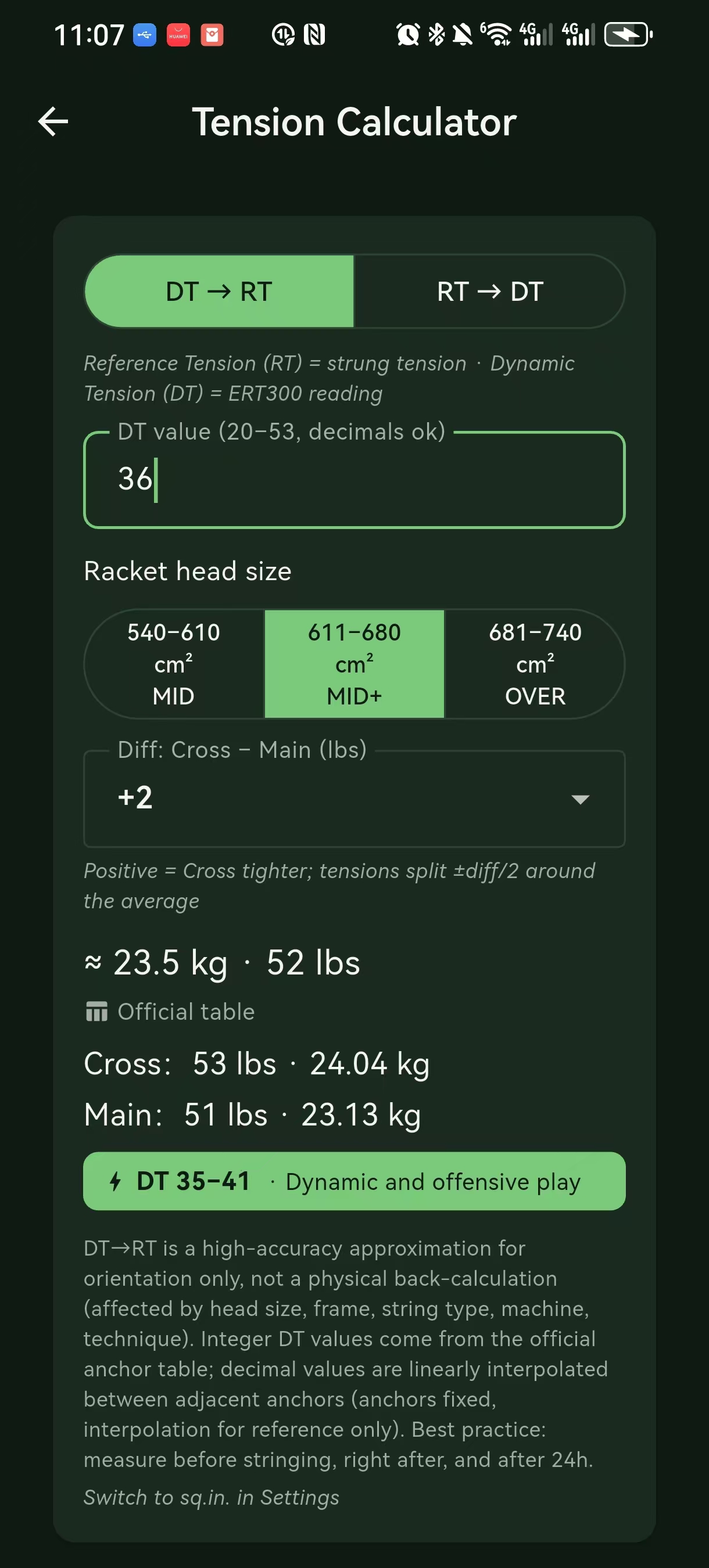
Most stringing machines report either DT or RT. Switching the unit in the App gives you the equivalent in the other system.
Inputs
| Field | Default | Notes |
|---|---|---|
| Original tension | empty | Number + unit (lbs or kg) |
| Direction | DT → RT (default) | Or RT → DT |
| Bed type | Polyester (default) | Polyester / multifilament / natural gut — affects the conversion factor |
| Head size bucket | MID+ (default) | 3 buckets — see Head size buckets |
Output
| Example | Result |
|---|---|
| DT 60 lbs polyester on MID+ | RT 56.4 lbs |
| RT 56 lbs multifilament on MID+ | DT 58.7 lbs |
The conversion uses a per-bed, per-bucket lookup table. Factors were derived from USRSA public bulletins.
When not to trust the conversion
- Bed type unknown — if you can't confirm the string is polyester / multifilament / gut, the conversion can be off by ±2 lbs
- Racket on the bucket boundary — e.g. a 95 in² racket sits right on the MID / MID+ border; pick the bucket that matches your manufacturer's spec sheet
- Mixed strings (hybrid main / cross) — each side needs its own conversion; the App handles them as separate entries
DT ⇄ RT conversion table (quick reference)
| Bucket | Polyester | Multifilament | Natural gut |
|---|---|---|---|
| MID (83–94 in²) | 0.94 | 0.97 | 0.99 |
| MID+ (95–105 in²) | 0.93 | 0.96 | 0.98 |
| OVER (106–115 in²) | 0.91 | 0.94 | 0.96 |
Factor =
RT / DT. To convert DT → RT, multiply by the factor; to convert RT → DT, divide.
RT ⇄ DT (the other direction)
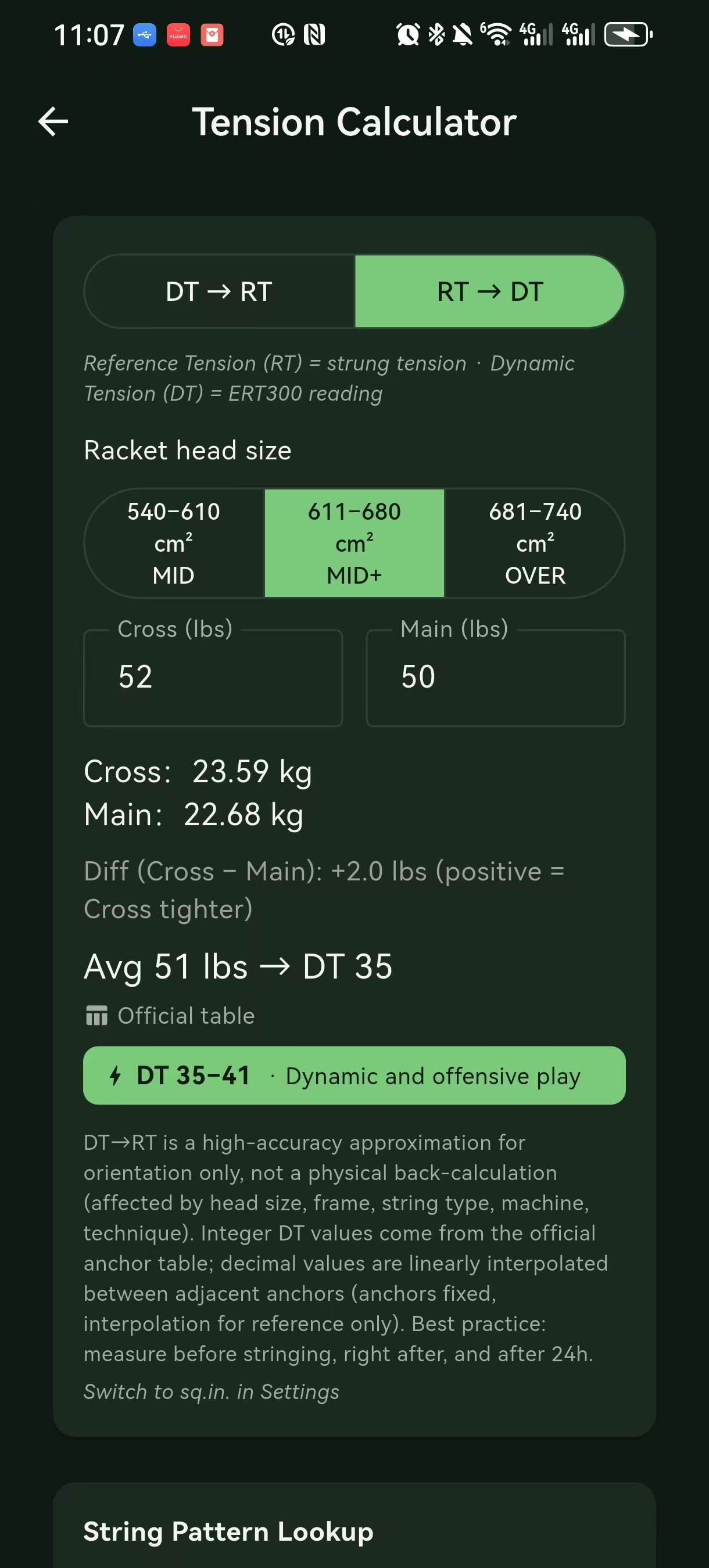
Reverse of the above. Same inputs, opposite direction. Pick this when the stringing machine gave you RT and your training data is in DT (or vice-versa).
lbs ⇄ kg
kg = lbs × 0.4536
lbs = kg × 2.2046| Pull (lbs / kg) | Style |
|---|---|
| 40 / 18.1 | Very loose (recreational) |
| 50 / 22.7 | Loose |
| 55 / 24.9 | Standard male |
| 60 / 27.2 | Standard male, tighter |
| 65 / 29.5 | Tight |
| 70 / 31.8 | Very tight (pro) |
"lbs" here is pounds-force (lbf). Players just say "50 pounds" colloquially.
The lbs ⇄ kg conversion is offered alongside DT ⇄ RT on the same screen; toggle a switch to flip modes.
⤳ Use this tension → log stringing
After any of the conversions above, the bottom of the result screen shows a large button:
[ Use this tension → log stringing ]What it does
- Picks the current racket (or asks you to pick from the list if no context)
- Pre-fills the Stringing log → Add record form (chapter 04):
- Date = today
- Tension main = the DT you converted (in lbs, after unit conversion)
- Tension cross = inherits from the racket profile
- Source =
From Tension conversion
- Marks the record's source so that future "this came from the converter" is verifiable
When to use it
- You just got your racket back from the stringer and the machine showed DT 60 lbs
- You want to record this restring in the App to drive the reminder
- Instead of typing the number again, tap the handoff button
When not to use it
- You're shopping for tension (just curious what RT 56 lbs feels like as DT 59)
- You're converting an old string job for reference (the source tag stays on but the date needs fixing)
Edit before save
The pre-filled values are editable — change anything you want before hitting Save. The source tag stays as From Tension conversion either way.
Limitations
- ❌ Ignores stringer accuracy: any stringing machine drifts ± 2 lbs
- ❌ Ignores temperature / humidity: after a few hours at 35 °C, the bed drops ~2 lbs
- ❌ Bed type confidence: "I'm not sure what was strung" → the result is in a wide band; record the actual string model after the fact at the form
Common questions
Can I record stringing without going through this?
Yes — the Stringing log is independent. The handoff is just a shortcut.
Do the LB ⇄ KG and DT ⇄ RT factors ever change?
The factor table is bundled in the App and updates with each release. We don't fetch new factors at runtime — this keeps conversions reproducible.
What if I convert an old restring?
Tap Use this tension → log stringing, change the date in the form, save. The source tag stays as "From Tension conversion" but the date reflects when it actually happened.
Where do these numbers come from?
DT ⇄ RT factors use a per-bed, per-headsize lookup derived from USRSA public bulletins and stringing-machine manufacturer data. Each has a source; the App does not fetch updated values at runtime.
See also
- 04 · Stringing log — where the handoff lands
- 03 · Rackets — the racket profile that the handoff depends on